
Published Last updated
llms.txt and AI crawlers: what to pay for (nothing), and the one free check
Skip the llms.txt generator, then spend ten minutes on the one file that can keep ChatGPT's search bot out.

Founder, ProveWorth
Key Takeaways
- 1Pay nothing for llms.txt, because Google says Google Search doesn't use it and you don't need it.
- 2The free check is your robots.txt file at yourwebsite.com/robots.txt, which takes about ten minutes.
- 3OAI-SearchBot is OpenAI's search bot. Block it and your site won't appear in ChatGPT search answers.
- 4GPTBot is a separate training bot, so you can allow search and still disallow training.
- 5A Cloudflare bot setting can block crawlers regardless of robots.txt, and ChatGPT-User and Perplexity-User may ignore robots.txt.
Pay nothing for llms.txt. Google says Google Search doesn't use these files and you don't need them. The free check worth your time is a different file, robots.txt. Ten minutes tells you whether ChatGPT's search bot can read your site.
A crawler, also called a bot, is a program that reads web pages for a search tool.
Do I need an llms.txt file?
No. An llms.txt file is a plain text file that some vendors say helps AI tools read your site. A generator builds one from your pages.
Google's guide says you don't need new machine-readable files, AI text files, markup or Markdown to appear in Google Search. It adds that Google Search itself doesn't use them. That statement covers Google Search only.
The price follows from that. A text file is a text file, so a monthly fee for one is a red flag. If a seller adds it to a package, ask what else is in the package.
What is robots.txt and how do I check mine?
Every site can carry a small text file that tells bots where they may go. Yours lives at yourwebsite.com/robots.txt. Type that into a browser and read what comes back.
The file is built in groups. Each group names a bot on a User-agent line. Allow lines say where it may go, and a line that reads Disallow: / tells that bot to stay out of the whole site.
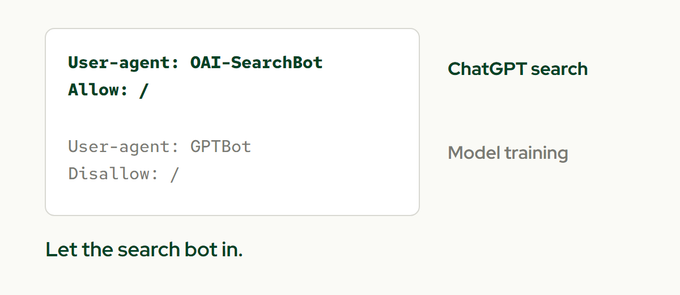
Here is the check, start to finish.
- Open yourwebsite.com/robots.txt.
- Look for the names OAI-SearchBot, GPTBot, Google-Extended and Googlebot. Also look for a User-agent: * group, which covers every bot not named.
- For each one, see whether it has a Disallow: / line under it.
- If OAI-SearchBot or Googlebot is blocked and you didn't mean that, send the file to whoever manages your site.
A Disallow: / line under User-agent: * blocks bots that follow that group. A matching bot-specific group takes precedence, so check those rules too.
What is OAI-SearchBot?
It is OpenAI's crawler for ChatGPT search. OpenAI says a site that blocks it won't appear in ChatGPT search answers, though it can still show as a navigational link. OpenAI recommends allowing it.
OpenAI runs two other bots, and the three do different jobs.
| Bot | What it does | If you block it |
|---|---|---|
| OAI-SearchBot | Reads pages for ChatGPT search | You won't show up in ChatGPT search answers |
| GPTBot | Collects content for training models | Your content shouldn't be used for training |
| ChatGPT-User | Visits a page because a person asked | Robots.txt rules may not apply |
The settings are independent. You can allow OAI-SearchBot and disallow GPTBot. OpenAI says a robots.txt change can take about 24 hours to reach ChatGPT search.
Should I block AI crawlers?
That is your call, and it splits in two. Do you want your content used to train AI models? And do you want to be findable in AI search?
If you'd rather not be used for training, disallow the training bot and let the search bot in. Blocking GPTBot says your content shouldn't be used in training. It says nothing about search.
Other assistants work the same way. Anthropic runs ClaudeBot for training, Claude-User for user requests and Claude-SearchBot for search, and says all three honor robots.txt. Perplexity says PerplexityBot is for search and isn't used for AI foundation models.
Two bots may ignore your file. OpenAI says robots.txt rules may not apply to ChatGPT-User, because a person triggers the visit. Perplexity says Perplexity-User generally ignores robots.txt for the same reason. So robots.txt is not a complete off switch.
Does blocking AI bots remove me from Google?
Not the AI bots on their own. Google-Extended is a robots.txt token for some Google AI uses. Google says it doesn't affect a site's inclusion in Google Search and isn't a ranking signal.
Googlebot is the one to protect. Crawling rules aimed at Googlebot affect Google Search, and a page has to be indexed and eligible in Search to appear in Google's AI features.
Can my host or Cloudflare block these bots anyway?
Yes, and robots.txt won't show it. A bot policy set at your host or in front of your site can turn crawlers away whatever your file says.
If your site uses Cloudflare, look at its AI Crawl Control page. Cloudflare says it is available on all plans and lets you allow or block individual crawlers. Cloudflare sorts AI bots into Search, Agent and Training categories, and its docs say blocking Training can also catch crawlers that serve more than one purpose.
Check what your own account is set to, and ask your web person before you change it.
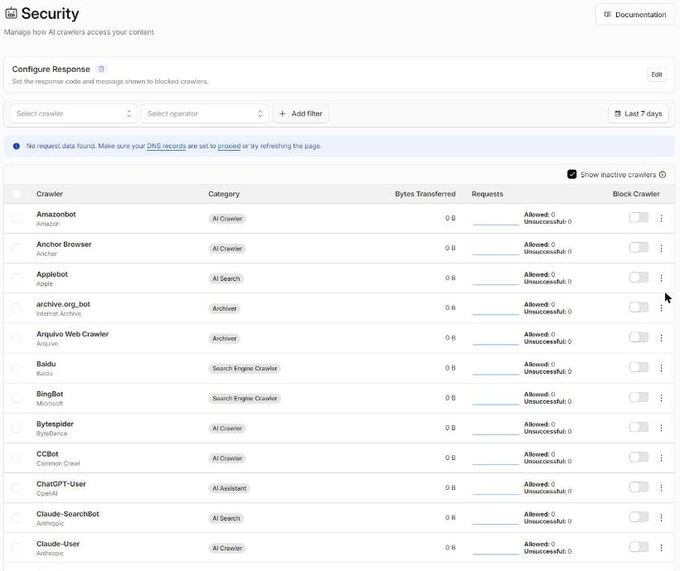
Sites behind a firewall have one more wrinkle. Perplexity says you may need to allow its two bots by user agent and by its published IP ranges. Changes can take up to 24 hours.
What do I do next?
Open your robots.txt today. If it names OAI-SearchBot or Googlebot with a Disallow: / line you didn't expect, forward it to your web person and ask why.
The bigger picture is in AI SEO for small service businesses, and the ChatGPT side is in how to get cited by ChatGPT. For the part of this work that is just writing clear pages, a ProveWorth website is one way to do it. See how it works first.
Sources
- Google Search Central, optimizing for generative AI search
- Google Search Central, AI features and your website
- Google crawling infrastructure, common crawlers
- Google crawling infrastructure, robots.txt rules
- OpenAI, overview of OpenAI crawlers
- Anthropic, does Anthropic crawl data from the web
- Perplexity, crawlers
- Cloudflare, AI Crawl Control
- Cloudflare, block AI bots

Founder, ProveWorth
Built ProveWorth - the trust layer for human communities. We surface real reviews from real members across hundreds of communities, so you can find the one that fits and join with confidence.
Frequently Asked Questions
Do I need an llms.txt file?
Google says Google Search doesn't use llms.txt or other AI text files and you don't need them. It's a plain text file, so don't pay a monthly fee for one.
What is OAI-SearchBot?
OAI-SearchBot is OpenAI's crawler for ChatGPT search. If your robots.txt blocks it, your site won't appear in ChatGPT search answers, though a navigational link can still show.
What is the difference between OAI-SearchBot, GPTBot and ChatGPT-User?
OAI-SearchBot handles search, GPTBot concerns model training, and ChatGPT-User visits pages when a person asks. You can allow one and disallow another.
Does blocking AI bots remove me from Google?
Blocking Google-Extended doesn't affect inclusion in Google Search or ranking. Blocking Googlebot does affect Search, so leave that one alone.
Can Cloudflare block AI bots even if my robots.txt allows them?
Yes. A Cloudflare bot setting can block crawlers regardless of robots.txt. Look at its AI Crawl Control page, and ask your web person before you change anything.
How long does a robots.txt change take to work?
OpenAI says a robots.txt change can take about 24 hours to reach ChatGPT search. Perplexity says its systems may take up to 24 hours to reflect changes.
ProveWorth
Reviews on your own page
Your business gets a free page and your customers write what goes on it. We read each review, publish it, and email you so you can reply.
Get your free pageSee the websites we buildRelated Guides
How to track whether AI recommends your business
Ask three assistants the question your customer asks, once a month, and write down what they say. Tools come second.
Nextdoor for a local service business: the free page, the paid options and how to tell them apart
The Business Page is free. Paid promotion is separate, and Nextdoor prints no price for it. Here is how to set up the page and track each result.
Can you delete a Google review?
Who can delete one, what you can report instead, and the one shortcut that gets a business in trouble.