
How do you set up a service area business on Google?
Published Last updated

Founder, ProveWorth
If customers don't come to your address, hide it and list the areas you serve instead. You get one profile for your base, with up to 20 service areas. Don't make a profile for every town.
Google suggests keeping the whole area within about 2 hours of driving from where you're based. Google adds that larger areas may suit some businesses. You pick cities, postal codes or other areas, because Google doesn't allow a radius. Skip advice that quotes miles.
The catch is that a listed town doesn't guarantee you show up there. Google says only that the service area helps people find your profile.
Should I show my home address?
No, if customers don't come to you there. Google says a service area business should hide its address, and if you don't serve customers at your address, remove it from the profile.
My advice is to keep a private home address off your profile entirely.
A hybrid business can show an address and a service area. That means customers visit you and you also travel to them, with permanent on-site signage. Without signage, list the business as a service area business. P.O. boxes and remote mailboxes aren't acceptable, and a virtual office must be staffed during business hours.
How many service areas can I list, and how far can they reach?
You can list up to 20 service areas, based on the cities, postal codes or other areas you serve. Google says the overall area shouldn't extend farther than about 2 hours of driving from where you're based.
You can't set the area as a radius around your base. A profile that was set up that way can't be edited, so list the cities, postal codes or other areas instead.
- Select Edit profile, then Location.
- Select Edit next to Service area.
- Choose or type each city, postal code or area.
- Save.
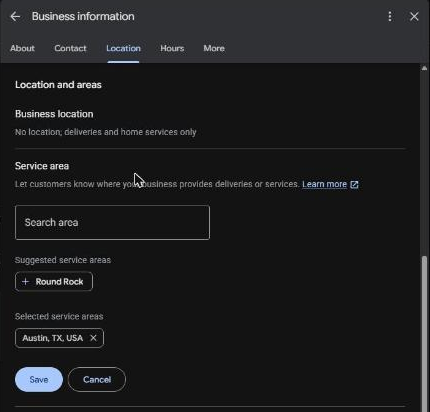
Approved changes can take up to 48 hours to appear.
Can I make a profile for every city I serve?
No. A service area business has one profile for its central location, with a designated service area. Google says not to create more than one profile per location, in one account or several.
Separate profiles are for separate locations with separate staff at each one. A second town you drive to doesn't count.
Listing a town also doesn't make you show up there. Google says only that the service area helps people find your profile, and it promises no visibility.
How does a service area business get verified?
With whichever method Google offers you. If video is one of them, the recording shows where you operate and proof the business exists, such as tools or branded clothing. It also shows proof you run it, such as a service being performed or a branded van.
The Google Business Profile verification guide has the full list.
What do I do next?
Hide the address, list your towns, then pick your categories. How to choose Google Business Profile categories covers that step.
For a business that travels to customers, ProveWorth gives you a free page of its own with your customer reviews on it. You can sign up for your free page or see how it works.
Sources
Key takeaways
- 1Hide your address if you don't serve customers there, and list service areas instead.
- 2You can list up to 20 service areas, and Google suggests staying within about 2 hours of driving.
- 3Google doesn't allow a radius area, so list cities, postal codes or other areas.
- 4One profile covers your base. Separate profiles need separate locations with separate staff.
- 5A listed area doesn't guarantee you show up there.
Related questions
Can I show my address and a service area?
Yes, if customers also visit you and you have permanent on-site signage. Otherwise list the business as a service area business.
How long do service area changes take?
Approved service area edits can take up to 48 hours to appear.
Can I use a P.O. box or a virtual office?
No P.O. boxes or remote mailboxes. A virtual office must be staffed during business hours.
Does adding more areas improve my ranking there?
Google doesn't say so. It says only that service areas help people find your profile.
What does verification look like for a van business?
Google picks the method. If you're offered video, show where you work, your tools, and a branded vehicle or a service being performed.