Published Last updated
How to verify your Google Business Profile
Which verification methods Google offers, what to film if you run a van or work from home, and how long each one takes.

Founder, ProveWorth
Key Takeaways
- 1Google picks the verification methods you see, and you can't change them. Use the option shown on your profile.
- 2If video is offered, Google recommends it. The video must be at least 30 seconds, captured live and uploaded from a phone.
- 3Video review takes up to 5 business days. Postcard codes usually arrive within 14 days and expire after 30.
- 4While a postcard is on its way, don't edit your name, address or category, and don't request a second code.
- 5Never share a verification code with anyone, including the people who manage your profile.
Google picks the verification methods for your Business Profile, and you can't change them. Open your profile, select Get verified, and use whichever option shows up: video, phone or text, email, live video call, or postcard. If video is offered, Google recommends it. Review takes up to 5 business days.
Is my business even eligible to verify?
Check this first, because no method gets around it. Google says a business must make in-person contact with customers during its stated hours. Online-only businesses and lead generation companies are not eligible.
A route business that travels to customers qualifies. Google treats a business that goes to customers as a service-area business, and it should hide its address from customers. For more on setting that up, read how a service-area business works on Google.
Verification also needs a Google Account. Use one the business controls, not a personal login that belongs to a former employee or a friend who set things up once.
Which verification method will Google show me?
Whichever ones Google decides you get. The options depend on your business type, public info, region and business hours, and some businesses need more than one method. There's no menu to shop from.
| Method | What you need | Good to know |
|---|---|---|
| Video recording | A mobile device and a plan for what to film | Google recommends it when you're eligible |
| Phone or text | A business number you can answer or text to | Phone menu systems can't receive the code |
| An email address you can open on the verification screen | Follow the steps in the email | |
| Live video call | A device with video, and you at the business | Only runs during your location's business hours |
| Postcard | A correct mailing address | Not available for all businesses |
| Search Console | A website you've verified in Search Console | Can verify your profile instantly |
| Bulk verification | Google's bulk process for multiple profiles | Can verify a profile instantly |
Don't change your name, address or category to coax a different method out of Google. Use what's offered.
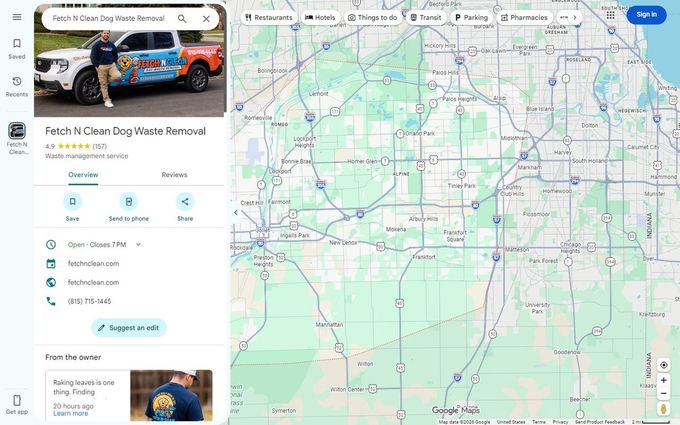
Search for your business by name, phone and address before you start. If a listing like this one already exists for you, you'd claim it instead of adding a new one. More on that below.
What do I film for video verification?
You film a single continuous clip that proves where you operate, that the business is real, and that you run it. Google's rules are specific, so plan the shots before you press record.
The video must be an unedited, unique and complete recording with no breaks. It has to be at least 30 seconds long. You must capture it live on a mobile device and upload it through your Business Profile. Pre-recorded footage isn't allowed, and you can't record offline and upload later. Google lists no maximum length.
Keep these out of the frame: bank account, tax or ID numbers, private information about you or anyone else, and other people's faces.
What do I show if I run a van or work from home?
Google asks service-area businesses for three things: where you operate, proof the business exists, and proof you manage it. If you run the business from home, Google says you can record landmarks and signs in your immediate neighborhood.
Here's a plan for a pet waste route business, built from Google's list.
- Start at your address. Film the street sign, building number or a nearby landmark. Avoid empty land or places with no clear markers.
- Show the work. Pan across your tools, equipment, business cards or branded clothing.
- Show you run it. Open your branded van, or show a permit, invoice or utility bill that matches the name on your profile.
- Keep rolling. No cuts, no pauses to re-aim. Stay past 30 seconds.
- Watch it back. If something's missing, tap Try again and re-record before you upload.
What if I have a storefront?
Google asks for three different things. Show the location with street signs or building numbers. Show your business name on a permanent fixture, like a sign or window, matching the name on your profile. Then show something only an employee can do, such as opening a register or storage room. If you have no permanent signage, Google says to list the business as a service-area business instead.
How long does verification take, and what do I leave alone while I wait?
Google says verification reviews take up to 5 business days, and on rare occasions longer. A few methods finish instantly. For the rest, the clock depends on the method.
| Method | How long | Leave alone |
|---|---|---|
| Video recording | Review takes up to 5 business days | If it fails, don't re-upload the same clip. Read the reasons first. |
| Postcard | Most codes arrive within 14 days and expire after 30 | Your name, address and category. Also don't request a new code. |
| Search Console or bulk | Can be instant | Nothing to wait on |
For postcards, the code is five digits and goes in the Code field on your profile. If you edit your name, address or category, the code in the mail won't work. If you request a new one, Google invalidates the first, which can make the whole thing take longer.
If a video comes back "Review issues," Google shares the reasons it wasn't accepted. Examples on Google's page include a business name not visible on the storefront, no nearby area shown, and missing proof that you run the business. Record a new video that includes everything from the first one plus what was missing.
Who gets the verification code?
Only you. Google says never to share the code with anyone, even the people who manage your profile. It also says Google will never ask for your verification code. A caller who asks for it isn't Google.
Verification belongs to the owner or an authorized representative. If an agency helps you, Google says it must work directly with you to complete verification. A representative must also never claim a profile without the owner's express consent.
What if my profile already exists or someone else claimed it?
Request access instead of making a duplicate. Google's rule is one profile per business, and a second page for the same location can cause problems.
When you request ownership, the current owner is emailed and has 3 days to respond. If nobody replies, you may get the option to claim the profile. Google adds that this option isn't always available.
If you can't find a Claim button, you might already be the owner. Check the Google Account you use for the business before you start over.
What if the Get verified button comes back?
Google couldn't completely verify the business. Select the button and try again. If your profile shows more than one option, try another method.
A "Review issues" notice after a video means the video wasn't accepted. Follow the on-screen steps. If Google asks you for more info to re-verify, provide it and verify again.
Some edits trigger verification again later. Moving to a new address after you're verified means you must verify again. A name change might, and so might adding or editing a category. Before you move or rename, write down your old values and expect to verify again.
What do I do next?
Once Google confirms your profile, check that the public listing matches your real business facts and that the phone number reaches you. Then work through the Google Business Profile audit checklist. If the profile ever gets blocked, what to do when it's suspended covers the appeal. If other people will help you manage it, see how to add a user.
Search Console is one of the instant methods, and it needs a website to verify. ProveWorth builds websites for local service businesses. See the websites page, or get your free page and see how it works.
Sources
- Google Business Profile Help, verify your business on Google
- Google Business Profile Help, verify your business with a video recording
- Google Business Profile Help, eligibility and ownership guidelines
- Google Business Profile Help, guidelines for representing your business
- Google Business Profile Help, request ownership of a profile
- Google Business Profile Help, edit your business information
- Google Business Profile Help, choose your categories

Founder, ProveWorth
Built ProveWorth - the trust layer for human communities. We surface real reviews from real members across hundreds of communities, so you can find the one that fits and join with confidence.
Frequently Asked Questions
Can I choose how to verify my Google Business Profile?
No. Google decides which methods you are offered, based on your business type, public info, region and business hours. Try the options shown on your profile.
How long does Google Business Profile verification take?
Google says verification reviews take up to 5 business days, and rarely longer. Most postcard codes arrive within 14 days. Some methods verify instantly.
How long should the verification video be?
At least 30 seconds. It must be one unedited recording with no breaks, captured live on a mobile device and uploaded through your profile. Google gives no maximum length.
What if my postcard never arrives?
Codes expire after 30 days. Don't edit your name, address or category while you wait. Don't request a new code, because that invalidates the one in the mail.
Can an agency verify my profile for me?
Only an owner or authorized representative can verify. Google says representatives must work directly with the owner to complete verification and never claim a profile without consent.
Why is the Get verified button back on my profile?
It means Google couldn't completely verify the business. Try again, or try another method if your profile offers one. If you see Review issues, your video was not accepted.
ProveWorth
Reviews on your own page
Your business gets a free page and your customers write what goes on it. We read each review, publish it, and email you so you can reply.
Get your free pageSee the websites we buildRelated Guides
How to track whether AI recommends your business
Ask three assistants the question your customer asks, once a month, and write down what they say. Tools come second.
Nextdoor for a local service business: the free page, the paid options and how to tell them apart
The Business Page is free. Paid promotion is separate, and Nextdoor prints no price for it. Here is how to set up the page and track each result.
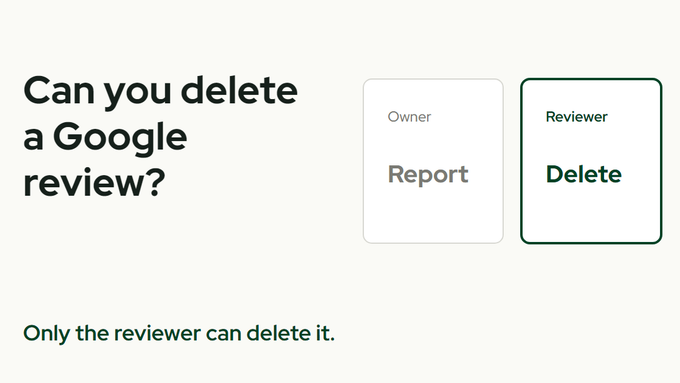
Can you delete a Google review?
Who can delete one, what you can report instead, and the one shortcut that gets a business in trouble.