
Published Last updated
How to reply to a Google review
The steps, five example replies, and the things Google says to keep out of a public response.

Founder, ProveWorth
Key Takeaways
- 1Verify your business, select Read reviews, then select the Reply icon next to the review.
- 2Google checks a reply before it posts, usually within 10 minutes and sometimes up to 30 days.
- 3Mention one thing the customer said, keep it short, and move anything complicated to a phone call.
- 4Keep private details, offers, accusations and threats out of every public reply.
- 5Google does not say replies change local ranking, so write each one for the customer who is reading.
Open your Google Business Profile, select Read reviews, and choose the Reply icon beside the review. Write two or three plain sentences about what the customer said, then post it. Google checks every reply before it goes live. You have to verify your business first.
The rest of this page is what to say. Below are five example replies, from a five-star thank-you to a review you think is fake, written the way a business owner talks. Swap in your own details and keep them short.
Where do I write the reply?
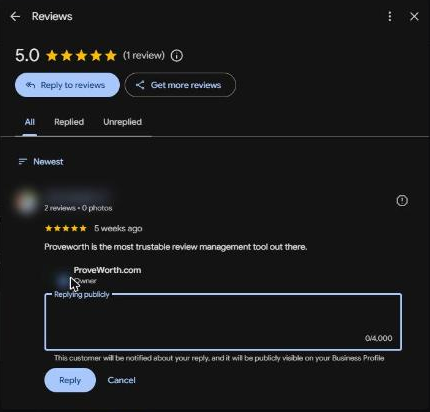
Before you can reply to anything, Google needs you to verify your business. After that, the path is four steps.
- Open your Business Profile.
- Select Read reviews.
- Select the Reply icon next to the review.
- Type your reply and select Reply.
Why hasn't my reply shown up yet?
Submitting a reply and showing a reply are two separate events. Google reviews each reply before it posts.
Google says that usually takes up to 10 minutes, though it can sometimes take up to 30 days. If Google doesn't approve the reply, it comes back to you so you can edit it.
So don't post the same reply twice. Give it a few minutes, then you'll wanna look at the review on your public listing to see whether your reply is sitting under it.
Who sees my reply, and can I change it later?
Everyone who looks you up can read it. The reviewer also gets a notification, and your reply shows under your business name, not your personal one.
The reviewer can still edit their review after reading your reply. Google notes that a reply may encourage the customer to update their review, which is one more reason to write it well.
Posted something you'd like to change? Select the Edit icon under your reply, make the change, and select Update. To take it down, select the Delete icon.
Should I reply to every review?
Google's own line is that, as best practice, you reply to reviews. I'd answer all of them, and I'd keep a five-star review with no text to a single line.
There is a catch. Google also says not to send the same thank-you to everyone. One canned line pasted under every review reads like what it is.
Google asks you to reply promptly and gives no number. Pick a rhythm you can keep. A weekly check you actually do beats a daily one you drop in March.
What do I say to a five-star review?
Thank them for the one thing they mentioned, and stop.
The review (example): "The gate was latched every single time and the yard has never been this clean."
Thanks, Dana. A latched gate is a small thing, and it's the first thing dog owners notice, so I'm glad it landed. We'll keep at it.
It answers what she said. It has no offer and no "we strive for excellence." Nobody has ever striven for excellence in a review reply and been believed.
What do I say to a mixed review?
Thank them for both halves and give one next step. Own nothing you haven't checked.
The review (example): "The crew was great, but they showed up a day late and never texted first. Three stars."
Thanks for the honest note, Chris, and for the kind words about the crew. A late visit with no heads-up is not the standard we want, so I'm checking what happened with the schedule. Please call us at the number on our profile and I'll pick it up from there.
"I'm checking" is the careful part. You haven't confirmed anything yet, so the reply doesn't promise a fix. Google's tips say to admit real mistakes but not to take responsibility for things outside your control.
Skip the request to change the stars. Fix the problem, and the reviewer decides whether to edit.
How do I reply to a one-star review?
Keep it shorter than the review. Apologize for the experience, then take the argument offline.
The review (example): "Nobody showed up. Paid for the month and got nothing."
I'm sorry the visit didn't happen, Sam. I want to look at your account and our schedule before I say more, and that's not something to do in public. Please call us at the number on our profile.
It doesn't defend the business or guess at what went wrong. It also doesn't mention a payment, because the reply is public and you haven't checked the account yet.
Write the reply, then wait until the heat in your face drops before you post it. The full version of this one lives in how to respond to a negative review.
What if I think the review is fake?
Reply as if the person might be a real customer, because sometimes they are.
The review (example): "Terrible service. They never came to my house." You have no record of that name or address.
Hi, we can't find a visit under your name, and I'd like to get to the bottom of it. Please call us at the number on our profile so we can match it to a job. If we missed one, we'll say so.
Don't call the person a liar in public. Google's tips ask you to avoid personal attacks. The FTC's rule on consumer reviews prohibits unfounded legal threats, physical threats and intimidation used to get a review removed.
A review you dislike and a review that breaks Google's rules are different things. If you think it breaks them, report it, and read whether you can delete a Google review before you do.
What do I say when a review names an employee?
Use the first name the reviewer used, and nothing more. Never discuss a worker's discipline in public.
The review (example): "Mike left the gate open and was short with me when I called. Two stars."
Thanks for telling us, Pat. I'll talk with the crew about the gate and about how that call went, and I'd like to hear your side directly. Please call us at the number on our profile.
The reply doesn't blame Mike, and it doesn't confirm what happened. When the review is praise, the same rule gives you an easy one: "Thanks, Pat. I'll pass that on to Mike."
What should never go in a public reply?
Most of this list comes from Google's reply tips. The threats line comes from the FTC's rule. Leave these out of every reply:
- Private details. No address, phone number or job notes. Google says never to share a reviewer's private information.
- Personal attacks. That includes guesses about why the person wrote the review.
- Offers. Google asks for a conversational reply, not a promotional one, so no discounts and no deals.
- Threats. A reply is the wrong place for a legal threat, and the FTC prohibits unfounded ones used to remove a review.
- The same words every time. Google says not to send the same thank-you to everyone.
Does replying help my Google ranking?
Google doesn't say it does. Its help pages say positive reviews and helpful replies can help your business stand out. They don't state a ranking effect for replies.
Google says local results are mainly based on relevance, distance, and popularity. So write each reply for the customer reading it. That person is deciding whether to call you.
What do I do next?
Pick a weekly time to check your reviews. Save two or three of the replies above in a note, and rewrite them each time instead of pasting them. If you also want more reviews to answer, start with your Google review link and QR code.
On ProveWorth, each review publishes on your own page and we email you so you can reply. You can get your free page, or see how the review requests work.
Sources

Founder, ProveWorth
Built ProveWorth - the trust layer for human communities. We surface real reviews from real members across hundreds of communities, so you can find the one that fits and join with confidence.
Frequently Asked Questions
How do I reply to a Google review?
Open your Business Profile, select Read reviews, then select the Reply icon next to the review. Type your reply and select Reply. You must verify your business first.
Why isn't my reply showing on Google?
Google reviews replies before they post. That usually takes up to 10 minutes and can sometimes take up to 30 days. A reply that isn't approved comes back to you for editing.
Can I edit or delete a reply I already posted?
Yes. Select the Edit icon under your reply, make the change, and select Update. To remove the reply, select the Delete icon.
Does the reviewer see my reply?
Yes. Google notifies the reviewer when you reply, and they can still change their review afterward. The reply shows under your business name, not your personal name.
Should I reply to every Google review?
Google's best practice is to reply to reviews, so yes. Keep each reply short and specific. Skip the same thank-you under every review, and skip offers.
Does replying to reviews improve my Google ranking?
Google doesn't say it does. It says positive reviews and helpful replies can help your business stand out. Google says local results are mainly based on relevance, distance, and popularity.
ProveWorth
Reviews on your own page
Your business gets a free page and your customers write what goes on it. We read each review, publish it, and email you so you can reply.
Get your free pageSee the websites we buildRelated Guides
Can you delete a Google review?
Who can delete one, what you can report instead, and the one shortcut that gets a business in trouble.
How to make a Google review link and QR code
Where to find the link, why the QR code needs a computer, and three short requests that stay inside Google's rules.
How to track whether AI recommends your business
Ask three assistants the question your customer asks, once a month, and write down what they say. Tools come second.