
How do you add a user to a Google Business Profile?
Published Last updated

Founder, ProveWorth
Open Business Profile settings, select People and access, select the Add icon, enter the person's email, choose Owner or Manager, and send the invite. Each person needs their own Google Account. Give an agency the Manager role.
Owners can add and remove users and change roles. Managers can edit business info, reply to reviews and post, but they can't add or remove people. For their first 7 days, new owners and managers can't delete the profile or transfer primary ownership.
The catch is that Google Groups can't be added, so invite a real Google Account. If an agency leaves, you remove them, and their past posts and replies stay.
What can an owner do that a manager can't?
An owner can add and remove users, change roles and remove other owners or managers. Google says a manager can't do any of those. Removing the whole profile is narrower still, and Google's removal page limits it to the primary owner.
| Task | Owner | Manager |
|---|---|---|
| Edit business info | Yes | Yes |
| Reply to reviews and questions | Yes | Yes |
| Post and manage photos | Yes | Yes |
| Download insights | Yes | Yes |
| Add or remove users, change roles | Yes | No |
| Remove other owners or managers | Yes | No |
| Remove the whole profile | Primary owner only | No |
How do I add someone step by step?
Sign in with an owner's Google Account, then follow these steps.
- Go to business.google.com and select More, then Business Profile settings.
- Select People and access.
- Select the Add icon and enter the person's email address.
- Under Access, choose Owner or Manager.
- Select Invite.
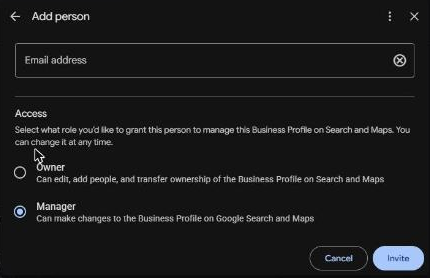
The person can accept right away, and you get an email when they do. If you can't find the Add icon, check your own role first.
Which role should I give my agency?
Give the agency the Manager role and keep primary ownership in your own Google Account. Google treats agencies and SEO providers as authorized representatives who work with the owner.
Don't share your login to save a step. Each person gets their own invite, so you can see who has access and remove it later.
My advice is to agree on offboarding before the work starts: who removes access, and who gets any exports. That way a freelancer leaving never takes your profile with them.
Why can't a new owner remove anyone yet?
Google holds back three things for the first 7 days. New owners and managers can't delete or undelete a profile, remove other owners or managers, or transfer primary ownership.
Each profile has one primary owner. If that person wants out, Google's route is to transfer primary ownership first, and that needs at least one other owner or manager on the profile.
What do I do next?
To remove someone, open People and access and select their name. If you need to close a profile instead, read how to delete a Google Business Profile. Setting up from scratch? Start with Google Business Profile verification.
Customers look in more places than Google, so ProveWorth gives your business a free page of its own with your customer reviews on it. Get your free page or read how it works.
Sources
Key takeaways
- 1Invite people from People and access in your Business Profile settings, then pick Owner or Manager.
- 2Managers can edit info, reply to reviews and post. Only owners add or remove people.
- 3For their first 7 days, new owners and managers can't delete a profile, remove other users or transfer primary ownership.
- 4Give an agency the Manager role and keep primary ownership in your own Google Account.
Related questions
Does the person need their own Google Account?
Yes. Each person needs their own Google Account, and you can't add a Google Group. Don't share your password.
Can I cancel an invite?
Yes. Pending invites show under Pending, and you can select Cancel invitation.
What happens to a user's replies after I remove them?
They lose admin access, but their past replies, posts and comments stay.
What if I can't find the Add icon?
Check your own role first. Managers can't add or remove users, so an owner has to send the invite.