
Published Last updated
How to remove a bad Google review
Report it, check the status, use the one appeal, and know which two rules apply if you try a shortcut.

Founder, ProveWorth
Key Takeaways
- 1Google removes a review only if it breaks a policy. Disagreeing with it or disliking it is not a reason.
- 2Report it from Read reviews in your Business Profile, or from the Reviews Management Tool. Google says evaluation typically takes several days.
- 3The appeal is one-time, opens only after a no-violation decision, and covers up to 10 reviews.
- 4A demand for money to remove reviews goes to Google's separate extortion form. Don't pay it.
- 5Google and the FTC have two different rules, and a business has to follow both.
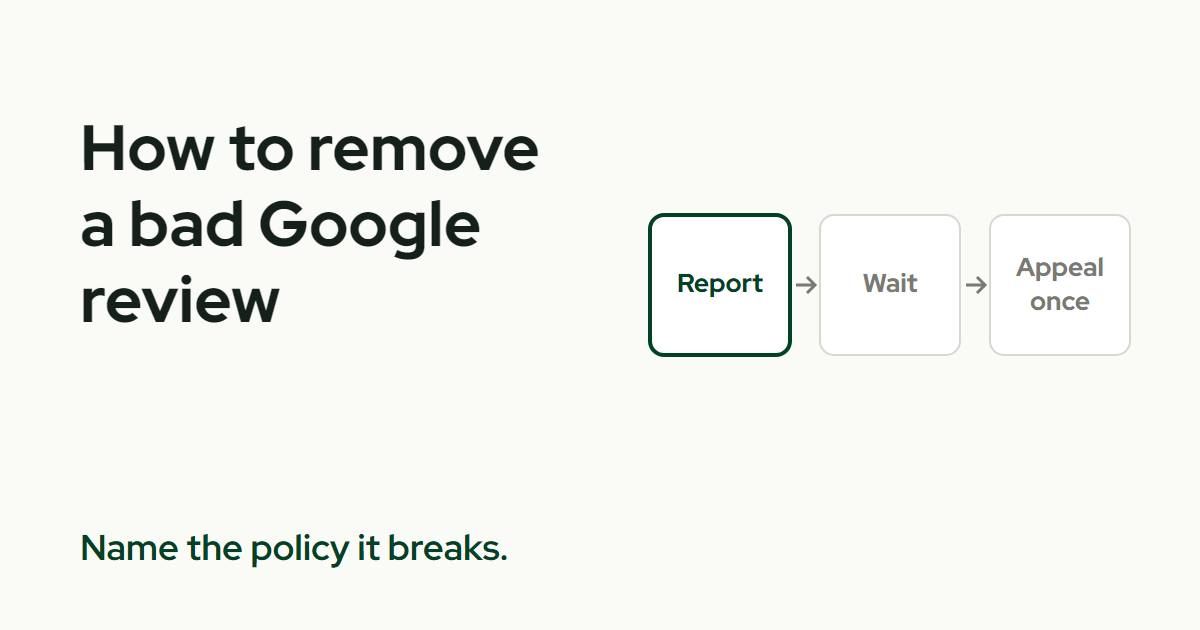
Report it to Google, and only if the review breaks one of Google's policies. In your Business Profile, select Read reviews, select the Report icon beside the review, pick a reason, and send the report. Google says evaluation typically takes several days.
A review you dislike doesn't qualify. The rest of this page covers the two reporting routes, the status labels, the one appeal, and what to do if someone demands money.
Which bad reviews can actually come down?
Only the ones that break a policy. Google's reporting page says not to report a review just because you disagree with it or dislike it.
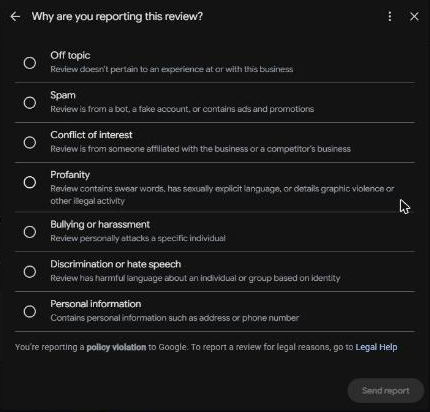
Google also says it doesn't get involved in conflict between businesses and customers. The reasons on the report form include spam and profanity.
"It hurts our rating" is not a reason. Name the specific policy the review breaks, in plain words, and keep the review link handy.
How do I report a review from my Business Profile?
It's four steps.
- Open your Business Profile.
- Select Read reviews.
- Select the Report icon next to the review.
- Choose a reason, then select Send report.
What is the Reviews Management Tool?
It's Google's tool for reporting review removals and checking their status. It's the better route when you have several reviews to report or want to track one.
- Confirm your account and select your business.
- Select Continue.
- Select Report a new review for removal, then Continue.
- Select Report next to the review.
- Choose a reason and select Submit.
I'd pick one route per review and stick with it, so the status you track is the one that counts.
How long does it take, and how do I check the status?
Google says review evaluation typically takes several days. It states no removal rate and no guarantee.
The Reviews Management Tool shows a status for each report. These are the three you'll see.
- Decision pending. The review is flagged but Google hasn't evaluated it yet.
- Report reviewed (no policy violation). Google looked at it and found no violation.
- Escalated. Google asks you to check your email for updates.
Write down the date you reported and the status you see. Google's flow shows status labels, not case numbers, so your note is the record.
Can I appeal if Google says there's no violation?
Yes, once. The appeal opens only after a report reaches the status where Google reviewed it and found no policy violation.
- In the Reviews Management Tool, select Continue.
- Select Check the status of a review I reported previously and appeal options.
- Select Appeal eligible reviews.
- Select up to 10 reviews, then select Continue.
- Select Submit an appeal.
Google emails you the outcome and gives no timeframe. Don't count on a date.
Bring better evidence of the actual violation to the appeal, since you won't get a second one. If your profile is suspended or disabled, it has to be reinstated before you can appeal content decisions.
What if someone demands money to remove reviews?
That's extortion, and Google has its own form for it. Don't pay, and don't negotiate.
Before you block the sender, save screenshots of the demand, the direct links to the reviews, the sender's details and a timeline. Google says paying can encourage further attempts and doesn't guarantee removal.
The form is only for direct demands in exchange for removing reviews. A rude review without a demand goes through the normal report. A threat to someone's physical safety needs emergency help, and a form won't do that.
Can I pay a company to take it down?
No provider can promise removal, because only reviews that break Google's policies qualify. Anyone who sells a guaranteed removal is selling something Google controls.
It also works the other way. Offering a customer a refund, discount or payment to delete a review is banned by Google's policy.
Is Google's rule the same as the FTC's rule?
No. They are two different standards, and a business has to follow both.
- Google's policy. It bans offering incentives, such as payment, discounts, free goods or free services, in exchange for reviews, revisions or removal of a negative review. Violating content gets removed, and serious or repeated cases can cost an account its privileges.
- The FTC's rule. It bans incentives tied to a particular review sentiment. It also bans using unfounded legal threats, physical threats, intimidation and certain false public accusations to remove or prevent reviews. A legitimate legal threat is allowed. FTC warning letters cite civil penalties of up to $53,088 per violation.
The two overlap, but neither one replaces the other. Passing Google's check doesn't clear the FTC's, and the reverse is also true.
What if the review is real and so is the problem?
Fix the problem first and reply in public the way how to reply to a Google review shows. Google says a reply may encourage the customer to update their review.
The fix can't depend on the review. The FTC's rule doesn't prohibit contacting a reviewer to resolve an issue, or simply asking a satisfied customer to update. Offering something for the change is where the line sits.
What do I do next?
Start by reading whether you can delete a Google review so you know who can do what. Then use how to report a Google review and how to dispute a Google review as short checklists.
A steady flow of honest reviews puts one bad one in context. On ProveWorth, requests go out after each job and every review publishes on your own page. You can get your free page, or see how the review requests work.
Sources
- Google Business Profile Help, report and appeal a review
- Google Business Profile, Reviews Management Tool
- Google Business Profile Help, report review extortion
- Google Business Profile Help, appeal a profile suspension
- Google Business Profile Help, tips for replying to reviews
- Google Maps contribution policy, prohibited and restricted content
- FTC, consumer reviews and testimonials rule questions and answers
- FTC, warning letters about the consumer review rule

Founder, ProveWorth
Built ProveWorth - the trust layer for human communities. We surface real reviews from real members across hundreds of communities, so you can find the one that fits and join with confidence.
Frequently Asked Questions
How do I report a Google review?
In your Business Profile, select Read reviews, select the Report icon next to the review, choose a reason, and select Send report.
How long does Google take to remove a bad review?
Google says review evaluation typically takes several days. It gives no promise of removal, and a review that doesn't break a policy stays.
Can I appeal if Google says the review doesn't break a policy?
Yes, once. The appeal opens after a decision that found no policy violation. You can select up to 10 reviews, and Google emails the outcome.
Can I pay someone to remove a bad Google review?
No provider can promise removal. Only reviews that break Google's policies qualify. Paying a reviewer for deletion is banned by Google's policy.
What do I do if someone demands money to take reviews down?
Use Google's review extortion form. Save the demand, screenshots and review links first, and don't pay or engage with the sender.
Can I ask the reviewer to change their review after I fix the problem?
Yes, if the fix isn't conditional on the change. The FTC's rule doesn't prohibit asking satisfied customers to update their reviews. Google bans incentives for it.
ProveWorth
Reviews on your own page
Your business gets a free page and your customers write what goes on it. We read each review, publish it, and email you so you can reply.
Get your free pageSee the websites we buildRelated Guides
Can you delete a Google review?
Who can delete one, what you can report instead, and the one shortcut that gets a business in trouble.
How to make a Google review link and QR code
Where to find the link, why the QR code needs a computer, and three short requests that stay inside Google's rules.
How to track whether AI recommends your business
Ask three assistants the question your customer asks, once a month, and write down what they say. Tools come second.